MEP Equipment Schedules: Reconcile Unique Tags Before Counting
An equipment schedule with 156 imported rows does not necessarily represent 156 pieces of equipment. Some rows may repeat the same asset across documents, describe an alternative scheme, or summarize several identical units. A distinct-tag count can also mislead when two real assets share a copied tag or an identifier is blank.
The practical goal is a register with one reviewed record for every asset included in the quantity scope, plus links to all supporting records. This is an information-reconciliation exercise for BOQs and equipment registers. The original example below concerns fan-coil-unit records only; it does not assess equipment performance or installation.
1. Define what one record represents
Separate equipment type from equipment instance. Twenty fan-coil units can share one type designation while requiring twenty individual asset records. NIBS’s COBie V3 documentation distinguishes the Type table from the Component table, which represents individual product or equipment instances. It also defines a unique name for each Component record. This is a useful data-structure reference, not an assumption that every project requires COBie.
Write a scope statement before counting: included buildings, floors, system, design option, issue date and supply responsibility. Identify whether the register covers proposed equipment, existing equipment, or both. Retain exclusions with a reason so a later reviewer can distinguish an intentional boundary from a missing record.
Check the native schedule’s presentation as well. Autodesk’s Revit 2024 schedule guidance explains that itemized schedules display instances individually, while grouping can combine instances into one row. An exported row count therefore needs to be checked against the schedule’s itemization, grouping and quantity fields. Headings and subtotals are not equipment.
2. Preserve identity and evidence separately
Keep an internal register key, the equipment tag as supplied, a proposed normalized tag, building, location, type, source file, source revision and source object identifier where available. Use the project’s agreed identity convention. A building-plus-tag combination can be useful where tag numbering restarts between buildings, but location alone is not a reliable identity.
Use normalization to flag candidates for review. Trimming accidental outer spaces may reveal that “FCU-021 ” and “FCU-021” refer to the same tag. Removing all punctuation or leading zeros can destroy meaningful distinctions. Keep original text and record approved corrections. Never manufacture a permanent project tag merely to make a spreadsheet uniqueness check pass.
A source object identifier helps trace a model record, but treat it together with its source context. Different files can contain references or copies of the same physical asset, and an asset may be recreated during model editing. Matching identifiers, positions, descriptions and document references provides evidence; no single field should silently settle every conflict.
3. Worked example: 156 rows become a reviewable register
Assume three current source exports contain 156 itemized data rows after headings and subtotals have been removed. All quantities are individual fan-coil units, not type summaries. The agreed scope is one building and the selected design scheme. For this teaching example, document checks establish the following findings; these deductions are not automatic software rules.
Twelve rows belong only to an unselected alternative scheme. Retain them as excluded evidence.
Twenty-four further rows are repeated representations of assets already present in the selected scheme. Confirm their identity and link them to the retained records.
The remaining candidate count is 156 − 12 − 24 = 120 equipment records.
The subtraction removes repeated records, not equipment. Each of the 24 duplicate-source rows must point to a retained record, with an explanation such as the same asset appearing in a building-wide schedule and a floor export. If two records instead represent two distinct units with a copied tag, both units stay in the candidate register.
Within the 120 candidates, assume 116 records have unambiguous individual tags. Two other records represent separate units but share one tag, and two records have blank tags. There are 118 nonblank entries but only 117 distinct nonblank tag values: 116 single tags plus the one shared value. A blind distinct-tag count would report 117 and miss three real units.
Before correction, report 116 identity-reviewed records and four records awaiting tag resolution, with 120 candidate assets overall. The responsible information owner confirms the shared-tag pair and corrects one tag, then assigns approved identifiers to the two blanks. The completed register now has 120 records and 120 approved unique asset tags. No equipment was added by fixing the data.
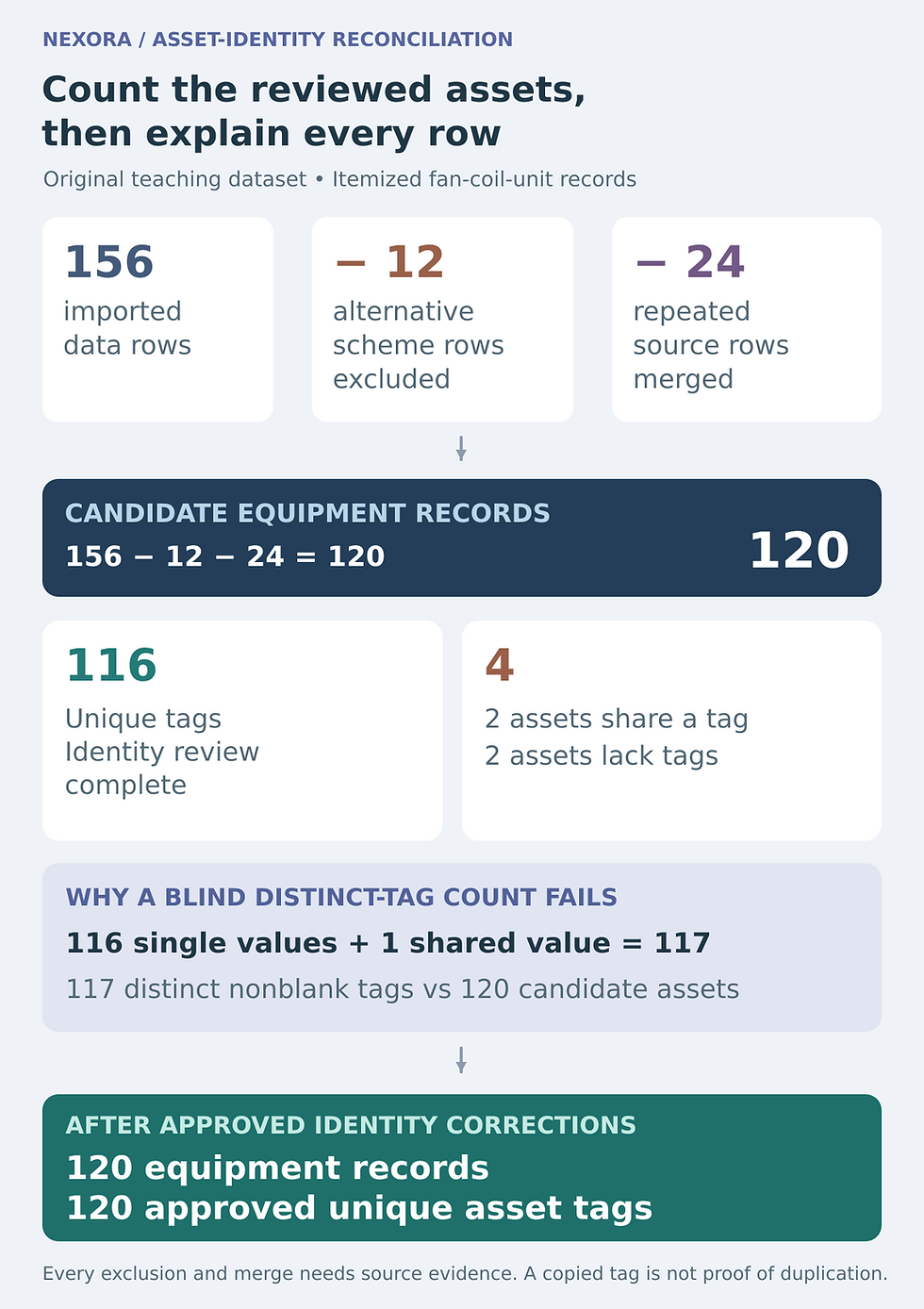
Original teaching dataset. Every subtraction is supported by an assumed document review. Duplicate tag values alone do not establish duplicate equipment.
4. Reconcile totals by a second, independent grouping
A matching grand total can hide one missing item and one extra item. Compare quantities by building, floor and type as well as overall. Suppose the final example register has 28 units on Level 1, 32 on Level 2, 30 on Level 3 and 30 on Level 4. Their sum is 120. Compare each subtotal against its appropriate source, then investigate differences at the asset-record level.
Also compare the approved type distribution. If two sources each total 120 units but disagree on which types occur on Level 2, the quantity reconciliation remains incomplete. Do not resolve that conflict by averaging counts or accepting whichever file was exported last. Establish which information governs the specific field and record the decision.
5. Close exceptions without erasing their history
Give each conflict an issue reference, affected records, owner and current status.
Separate confirmed duplicate representations from genuine assets with duplicate tags.
Keep blank identifiers visible with temporary internal tracking keys until approved tags arrive.
Retain a link from every excluded or merged source row to its review decision.
Record the final register version, source issue set and date of reconciliation.
Run two final checks: every included asset has one register record, and every imported source row has a documented disposition. Then export a clean quantity summary alongside the exception history and source references. Those checks test opposite directions and help reveal records lost during filtering or duplicated during joins.
The durable deliverable is more than a tidy count. It explains why each asset is included, which records describe it, and how conflicts were resolved. That evidence lets the estimator repeat the reconciliation after a new issue without confusing another appearance of an existing asset with another piece of equipment.



Comments